Choosing a music generator
The best AI music generator depends on your job
There is no single best AI music generator. The right tool depends on what you need: vocals, instrumental sketches, privacy, commercial use, or tight budgets. Here is how to compare classes of AI music tools and choose the right fit for your Mac workflow.

Tarun YadavPublished October 4, 2026 · 6 min read · Search intent: commercial
The short answer
The best AI music generator is the one that fits your job. For instrumental sketches on a Mac, local apps like LoopMaker are strong. For finished vocals, cloud-based services still lead. Budget, privacy, and commercial needs all affect the right choice. Use your own creative brief to test candidates. No single tool does everything best.
If you ask which is the best AI music generator, the only real answer is: best for what? Needs differ. Some tools shine at vocals, others at instrumental loops or privacy. You might want fast output for sketches, or commercial clearance for licensing. Knowing your main job helps you skip hype and focus on the features that matter. I have tested dozens of AI music tools on a Mac, and the differences are real.
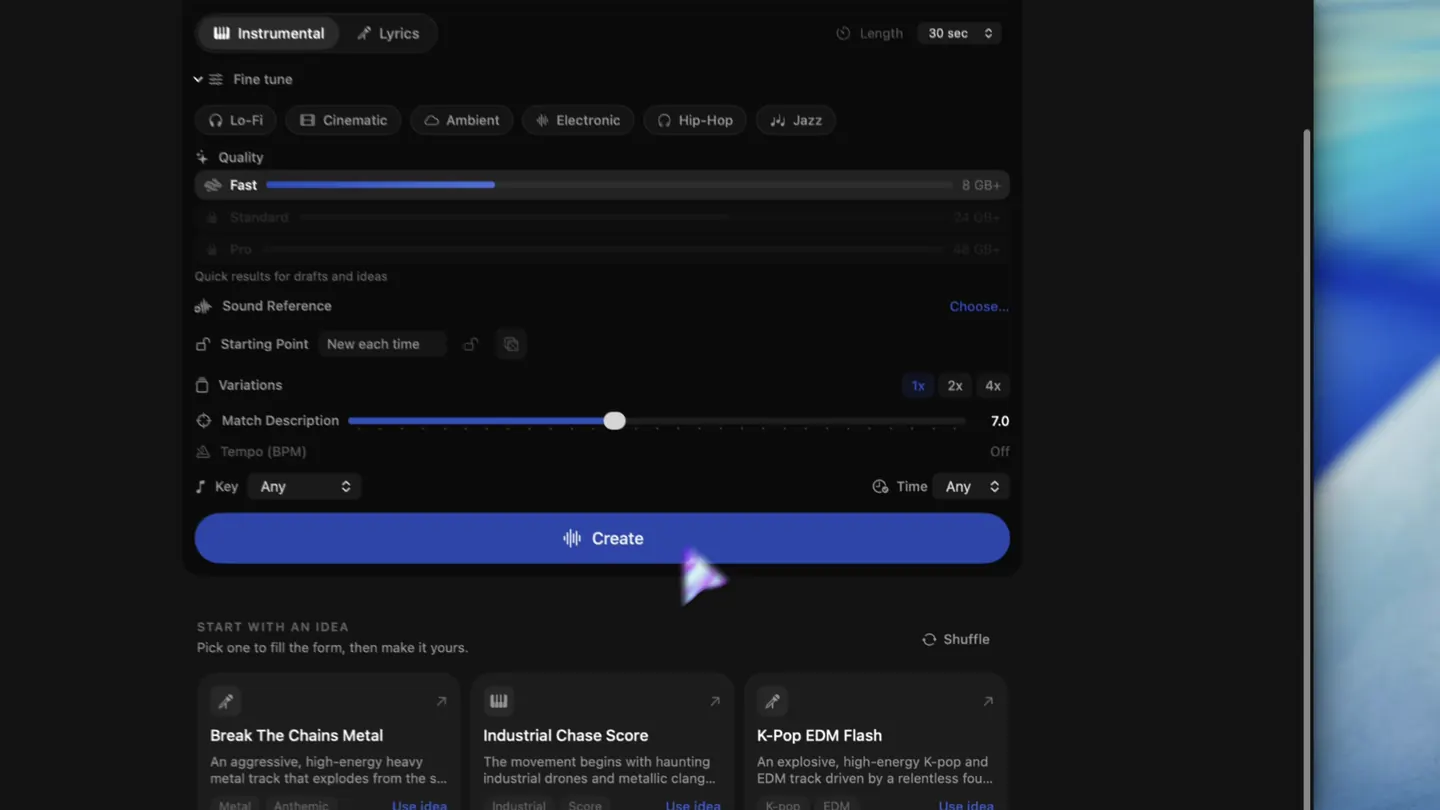
LoopMaker is a local Mac app for instrumental work. It is a one-time $49 license, not a subscription. You need an internet connection for the first setup and updates, but after that, generations run on your Mac. You need at least 16 GB of memory for fast instrumental work, and more for lyrics or experimental renderings. It exports WAV and M4A. LoopMaker is best for loop, bed, sketch, and temp score tasks.
Best AI music generator is a job description
No single AI music generator is the best at everything. Most tools specialize. A cloud service may offer more advanced vocals, but a local Mac app gives you privacy and one-time pricing for instrumental output. Before you buy, write down the job you need done. Are you demoing ideas, finishing tracks with vocals, or scoring video? That answer shapes your choice more than any leaderboard.
Avoid lists that rank tools without context. You will not get the same results from a vocal-driven cloud app as from a local, loop-first generator. Compare AI music generators by matching their core strengths to your workflow. For example, if you need rapid loops for editing, a Mac-native tool is faster. If you need long, polished vocal tracks, a cloud tool may win.
- Instrumental loops: local Mac app
- Polished vocals: cloud service
- Commercial clearance: direct licensing
Five jobs and the tool class that fits each
AI music users have five main needs: 1) Polished vocals, 2) Fast instrumental sketches, 3) Private iteration, 4) Commercial clearance, 5) Budgeting. For polished vocals, cloud-based generators have more training data and offer longer, more detailed songs. For fast sketches, local Mac apps are quicker and do not depend on upload speed. For private work, local tools keep files on your hardware. Each class has tradeoffs.
Commercial clearance favors tools with clear, direct licensing terms-often cloud services with business options. Budgeting tips: local apps like LoopMaker have no recurring fees, but you need enough RAM for best results. Cloud tools may offer free trials but can get costly for extensive use. For each job, list your must-haves, then compare AI music tools in that category. No class wins every job.
- Vocals: cloud-based generators
- Fast sketches: local Mac app
- Commercial: business cloud or local
Budget models: subscription, credits, one-time
Most top AI music tools use one of three pricing models. Subscriptions charge monthly or yearly for access, but may cap generations. Credit-based tools sell packs of uses, which can run out quickly if you test a lot. One-time licenses, such as LoopMaker at $49 (per product terms as of June 2024), give unlimited local use after activation, but require enough Mac memory to get full value.
Factor in hidden costs. Cloud services may lock features behind higher subscription tiers. Some credit systems do not refund failed generations. Local apps need enough RAM: 16 GB for fast instrumental, 24 GB or more for vocal workflows, and 48 GB for pro experiments. Always check the latest terms and model availability on the product site before you buy. Your actual cost depends on how you work.
- Subscriptions: monthly cost, may cap use
- Credits: pay per export
- One-time: pay upfront, RAM needed
How to test candidates in one afternoon
Testing AI music generators is simple: use your own brief. Write a 1-2 sentence prompt for the music you need. Run the same prompt on each candidate tool. Compare output speed, export quality, and ease of workflow. For instrumental loops, check how fast you can generate, tweak, and export. For vocals, listen for clarity and phrasing. Note any license or export limits.
Use a timer. See how many usable results you get in 60 minutes. Check system resource use: does the app slow your Mac or require a browser? Try exporting to WAV or M4A and dropping into your DAW or video editor. If commercial use matters, review the terms for each result. Testing with your own job is the only way to compare AI music generators honestly.
- Use your own prompt
- Time each step
- Test export and licensing
Where LoopMaker fits, and where it does not
LoopMaker is strongest for instrumental sketches, loops, beds, textures, and temp scores on Apple Silicon Macs. It is a local app: you pay once, and after setup, can generate loops without an internet connection until the next model update. You can export results to WAV or M4A. If you work with logic, GarageBand, or video tools, dropping in LoopMaker exports is quick and practical.
LoopMaker is not the top pick for long, polished vocal tracks. Cloud-based services still lead for vocals and finished songs due to larger models and more training data. LoopMaker also requires a minimum of 16 GB RAM for fast results, and more for advanced workflows. If you want total privacy, local generation is best, but you still need internet for setup and updates.
- Best for: local instrumental loops
- Not for: polished vocals
- Needs: 16 GB+ RAM, Apple Silicon
Frequently asked questions
What is the best AI music generator overall?
There is no single best AI music generator. The right tool depends on your job. For instrumental sketches on Mac, local apps like LoopMaker are strong. For long, polished vocals and finished songs, cloud-based services are ahead. Write down your needs and test a few tools before you buy.
Is a free AI music generator good enough?
Free AI music generators are fine for casual sketches and experimenting with prompts. For serious work, free versions often have limits: short audio, watermarks, or export caps. If you need reliable exports, privacy, or commercial rights, you usually need a paid plan or a local app.
What should I compare before choosing an AI music tool?
Compare output quality, speed, export options (WAV, M4A), privacy, license terms, and total cost. Check if you need vocals or just instrumental loops. Test each tool with your own creative brief. For Mac users, make sure your hardware meets the memory requirements for local tools.
Which AI music generator is best for commercial work?
For commercial work, use a tool with clear, direct licensing. Cloud services with business plans offer easy clearance for finished songs and vocals. For local instrumental work, check that the license allows commercial use. Always read the latest product terms to avoid rights issues.
Sources and testing notes
- Google helpful content guidance — Search guidance on first-hand value, authorship, and audience fit.
- Suno pricing — Current Suno plan, credit, and download allowances; pricing can change.
- LoopMaker product page — Current pricing, Apple-silicon guidance, and export formats.
- U.S. Copyright Office AI report, Part 2 — Primary-source summary of copyrightability principles for AI-generated material.
- LoopMaker product pages and current guardrails — checked October 4, 2026. This entry describes practical starting points, not guaranteed output or rights.
Test your own workflow
The best AI music generator is the one that fits your needs. Write your brief and test candidates in one session. Compare output and export in your own DAW before you buy.